


I’ve been managing music releases for independent artists on a freelance basis for about four years now. It started as a side project — a friend needed help getting his EP onto Spotify and Apple Music, and somehow that turned into a small but steady stream of clients who needed the same thing. For the first two years, I was piecing everything together manually. I’d use one platform to distribute to certain stores, another for licensing metadata, and I was constantly logging into separate dashboards to check royalty splits, track plays, and fix ISRC codes that got mangled somewhere between upload and publication. Every release cycle felt like assembling furniture without the instruction sheet. I was spending upwards of six hours per release just on the administrative side of things — not mixing, not mastering, not even talking to the artist about creative direction. Just moving files around and hoping nothing broke.
The clients themselves varied wildly. Some were bedroom producers releasing their first single, some were established independent acts who had been doing this long enough to have opinions about every metadata field. What they had in common was that they wanted their music live quickly, they wanted their royalties paid correctly, and they wanted me to stop emailing them about delays. I tried a few different tools over those early years. One distribution service had a dashboard that looked like it hadn’t been updated since 2011. Another had reasonable features but charged a per-release fee that made the math uncomfortable when a client wanted to push out four singles in two months. I even experimented with having artists handle their own distribution while I focused on the metadata and upload prep, which created a different kind of chaos because suddenly I was troubleshooting someone else’s account at 11pm.
The Breaking Point: Why I Switched
The breaking point came during a particularly stressful month when I was managing three releases simultaneously for two different clients. One artist had a label deal falling through at the last minute and needed everything redistributed under a new name. Another had a dispute with a former collaborator about how royalty splits were set up on a previous release. I was spending more time untangling those issues than actually moving forward, and I kept bumping into the limitations of whatever tools I was using at the time. A colleague mentioned DistroKid in a group chat — not with any particular enthusiasm, just a passing “have you tried this?” — and I looked it up that same evening. After reading a DistroKid review or two and poking around what I could find about its features, I was cautiously interested. The pricing model was different from what I was used to — annual subscription rather than per-release fees — and that alone made me want to understand it better before committing.
First Impressions of DistroKid
My first impression of the platform was that it was more stripped-down than I expected. There wasn’t a lot of marketing fluff on the page, which I actually appreciated. Some of these tools spend so much energy on the landing page that you start to wonder if the product is compensating for something. DistroKid felt like it was built by people who wanted to get music onto streaming platforms without unnecessary friction. I signed up for a paid tier — there’s no free version, which some people find off-putting, but given that the per-release model had been costing me significantly more, the annual fee felt reasonable from a volume standpoint. Onboarding was fast. I had my first test upload — a single I was preparing for a client — going within about twenty minutes of creating the account. That included filling out all the metadata fields, assigning an ISRC, choosing stores, and setting a release date. I’ve done that same process on other platforms in forty-five minutes just because the forms were slow or the UI kept losing my progress.
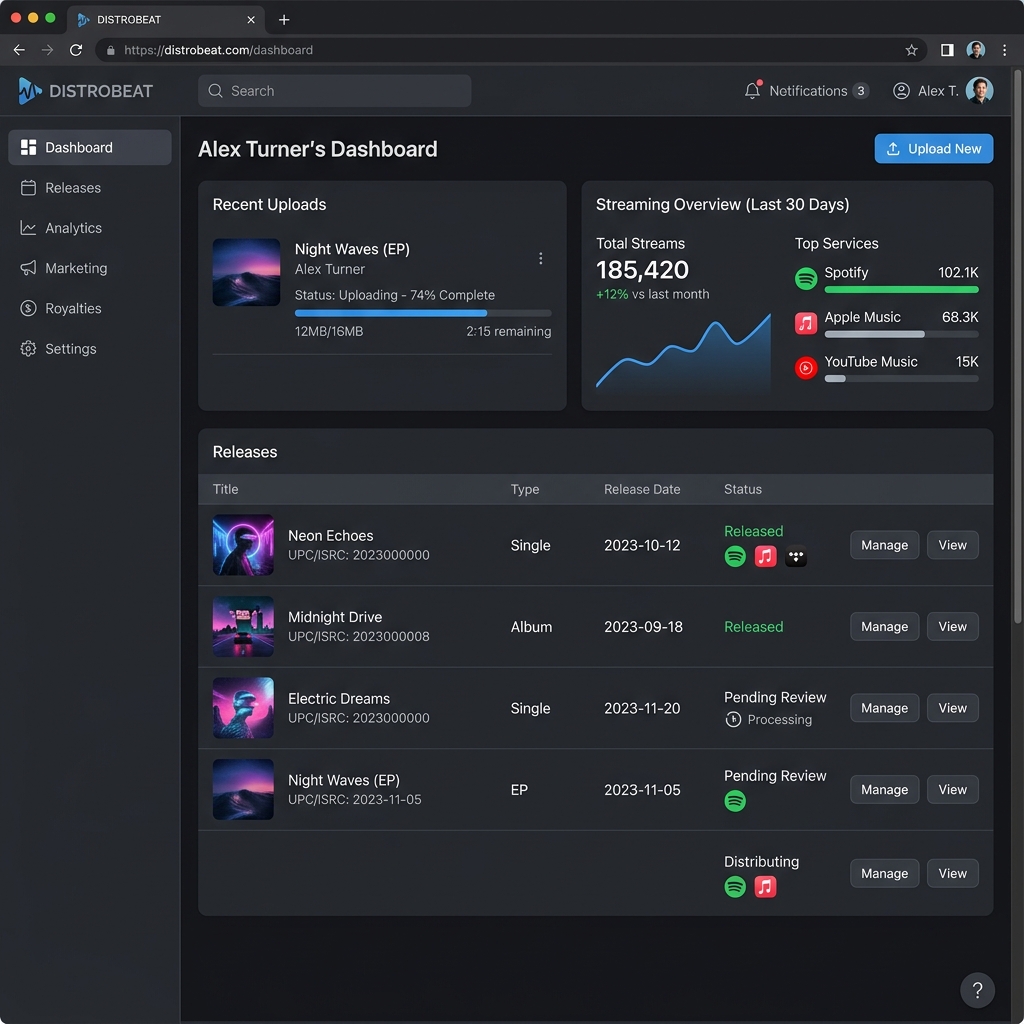
The DistroKid dashboard — clean, minimal, and focused on getting music live fast
Upload Speed: Where DistroKid Stands Out
The thing that stood out immediately was how quickly releases went live. I had been used to waiting four to seven business days in some cases, and on one platform I once waited almost two weeks for a single to appear on a major streaming service. With DistroKid, the first release I submitted went live in about two days. Now, that varies — some stores are faster than others, and I’ve had a couple take a bit longer — but the general pace changed how I schedule client timelines. I used to build in a full two-week buffer before a release date. I’ve since been able to tighten that up considerably, which matters a lot when an artist decides at the last minute that they want to release around a specific date to capitalize on something happening in the news or culture.

A typical indie producer setup — DistroKid simplifies the distribution workflow
The Honest Downsides
I want to be honest about what doesn’t work as smoothly. The royalty split feature — where you can divide earnings between multiple collaborators automatically — is useful, but it took me a couple of releases to understand exactly how the percentages interact with the platform’s own fee structure. There were a few moments where I thought a split was configured correctly and then had to go back and check because a client got a question from their collaborator about the numbers. It’s not that the feature is broken; it’s that the explanations within the platform assume a baseline understanding that not everyone has, including some of my clients who wanted to manage their own accounts. I ended up writing a short internal guide for clients specifically about how splits work on this platform, which added some time I hadn’t planned for.
There’s also the matter of what happens when something goes wrong with a release — a track gets rejected by a store, or there’s a content ID issue on YouTube. The support process has felt slower than I’d like on a couple of occasions. I understand these companies deal with enormous volume, but when a client is asking every day why their song isn’t appearing somewhere, the turnaround time on a support ticket becomes a real issue. I’ve had to manage client expectations more carefully during those windows, which is its own kind of work. That said, most releases go through without any issues, and the problems I’ve encountered were relatively minor in the larger picture.
The Value Proposition: Unlimited Releases
What I genuinely value, and what I would’ve paid significantly more for back when I was doing things the old way, is the ability to keep as many releases going as I need without doing math on per-release costs. In a busy month I might push out six to eight singles across different clients. Before, that would’ve been a meaningful budget line in my operating costs. Now it’s a fixed annual expense that I’ve already accounted for. The time savings are real too — I’ve cut my average administrative time per release from roughly six hours down to somewhere between two and three, depending on complexity. That might not sound dramatic in isolation, but across twenty or thirty releases a year, it adds up to weeks of recovered time.
Final Thoughts and What I Am Still Learning
One thing I’m still figuring out is how to make better use of the analytics side of things. I’ve been mostly focused on the upload and distribution workflow, but there’s data available about streams and royalties that I haven’t fully explored for my clients. A few of them are starting to ask more questions about performance tracking, and I want to understand whether I can pull useful reporting from DistroKid directly or whether I need a separate tool layered on top. That’s probably the next thing I’ll spend time on — building out a proper reporting process for clients who want that level of visibility.
DistroKid: Pros & Cons
| Category | Rating | Notes |
|---|---|---|
| Upload Speed | ⭐⭐⭐⭐⭐ | Releases go live in 1-2 days, fastest in the industry |
| Pricing Model | ⭐⭐⭐⭐⭐ | Unlimited releases for a flat annual fee |
| Ease of Use | ⭐⭐⭐⭐ | Clean UI, minimal bloat, gets the job done |
| Royalty Splits | ⭐⭐⭐ | Useful but confusing to set up initially |
| Customer Support | ⭐⭐⭐ | Slower than ideal for urgent release issues |
| Analytics | ⭐⭐⭐ | Data available but could be more actionable |